
Boss PC System
The company computer where bosses hire staff, set ranks and pay, and move company money; admins place it with /bosslaptop.
What it is
The Boss PC is the company computer for job bosses (police, EMS, taxi and other jobs). From it a boss runs the company: who works there, their rank and pay, and the company bank account. Admins put a boss laptop on any desk for any job with one command.
How it works
Go to the company's PC
Walk to your company's boss laptop (or the boss desk at Mission Row for police and Pillbox for EMS). Use the third eye (Left Alt) on it and pick Boss PC. The PC opens nowhere else.
You must be the boss
Only players with the job's boss rank can log in, and only while they stand next to the PC.
Use the apps
| Page | What a boss can do |
|---|---|
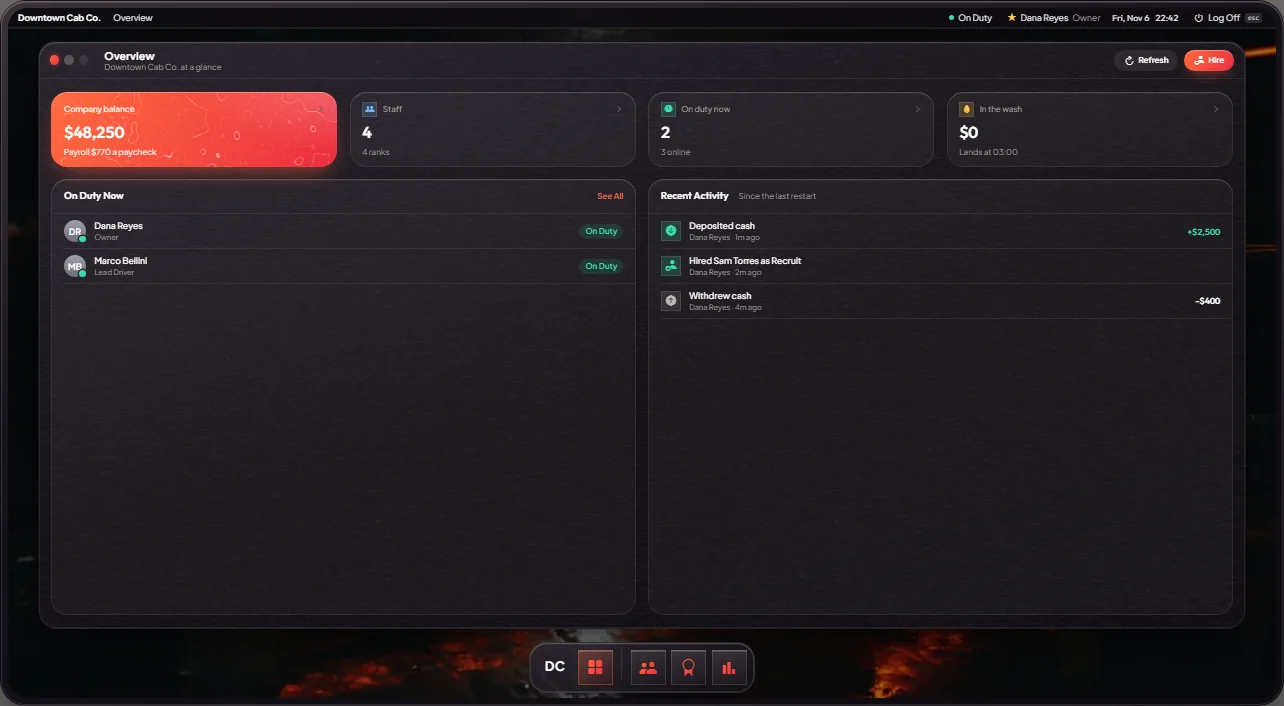
| Overview | Company balance, who is on duty now, recent activity |
| Staff | Everyone in the company, online or not. Promote, demote or fire. |
| Hire Nearby | Offer the job to a player standing within 10 m. They must accept. |
| Ranks & Pay | Rename ranks and set each rank's pay per paycheck (at most $600) |
| Funds | Deposit cash into the company or withdraw it to your cash |
Hires, rank changes and firings also update the player's saved jobs on the Jobs tablet (F3), where bosses also have a Boss page. Taxi companies earn money because 20% of every taxi fare goes into the taxi company account.
Money washing on the Boss PC is off for every company unless the owner turns it on for one. When it is on, dirty money sent to the wash arrives in the company account at 03:00, minus a 35% fee.
Keys & commands
| Command | What it does | Who |
|---|---|---|
| Third eye → Boss PC | Log in at a boss laptop | The job's boss |
/bosslaptop <job> | Place a boss laptop for that job, for example /bosslaptop taxi | Admins |
/removebosslaptop [id] | Remove the laptop with that number, or the nearest one within 3 m | Admins |
/bosslaptops | List every placed laptop with its number, job and distance in the chat | Admins |
Customise in game
Type /bosslaptop <job> and a laptop follows where you look. Aim at a desk, then:
mouse wheel or Q / E to rotate, ↑ / ↓ for height, Enter to place,
Backspace to cancel. The laptop is saved and comes back after a restart. The job must have a boss rank.
Config options
File: mvx_esx/modules/society/config.lua.
| Option | What it changes | Example |
|---|---|---|
Config.MaxSalary | Highest pay a boss can set for a rank, per paycheck | 600 |
Config.BossPC.MaxSalaryByJob | A different pay limit for one job | { police = 600 } |
Config.BossPC.HireDistance | How close a player must stand to be hired (metres) | 10.0 |
Config.BossPC.AdminGroups | Staff groups that may place and remove laptops | { 'owner', 'admin' } |
Config.BossPC.LaptopModel | The laptop prop | 'prop_laptop_01a' |
Config.BossPC.LaptopOptions | Turn money washing on for one company | bahama = { wash = true } |
Config.BossPC.WashFee | Share of washed money that is lost | 0.35 |
Config.BossPC.NoWash | Companies that can never wash | { police = true, ambulance = true, taxi = true } |
Apply with restart mvx_esx.
Admin Quick Test
Setup
- Make yourself the police boss:
/setjob me police 4(rank "Chief", the boss rank). - Give yourself cash:
/giveaccountmoney me money 1000. - For the hire step, have a second player online.
Teleport
- Go to Mission Row police station, at the police boss desk:
/tp 459.71 -986.48 30.73(or Admin tablet HOME → World → Teleport with 459.71, -986.48, 30.73).
Place a laptop
- Type
/bosslaptop police. A laptop follows where you look and a card shows the keys. Aim at a desk, rotate with the mouse wheel or Q / E, set the height with ↑ / ↓, and press Enter. You see "Boss laptop #N placed for Police" and the laptop stays on the desk.
Log in
- Stand next to the laptop. Third eye → Boss PC. The Overview page shows the company balance, who is on duty and recent activity.
Money
- Funds → Deposit 500. Your cash goes from $1,000 to $500 and the company balance goes up by $500. Withdraw 500 moves it back.
Staff and ranks
- The second player stands within 10 metres. Hire Nearby → Offer Job. When they accept, they join police at the lowest rank and show in Staff.
- In Staff, Promote them once, then Fire them. They go back to unemployed.
- Ranks & Pay: change one rank's pay (at most $600 per paycheck) and Save.
Clean up
- Type
/bosslaptops. Your laptop is listed in the chat with its number and distance. - Stand at the laptop and type
/removebosslaptop. It disappears. Put your job back, for example/setjob me unemployed 0.
If it doesn't work: only the job's boss rank can log in, and only while standing next to the PC. /bosslaptop refuses a job without a boss rank, and the laptop must be placed within 20 metres of you. The admin commands need the owner or admin group.