
Gang System
Staff-made gangs with ranks, a boss tablet, gang cars, stashes and third-eye cuffs.
Staff create gangs (or mafias) in game, with their own ranks, colour, cars and places on the map. Members get a gang garage, stashes and third-eye actions to cuff, search and escort people. The top rank is the boss, who runs the gang from a tablet.
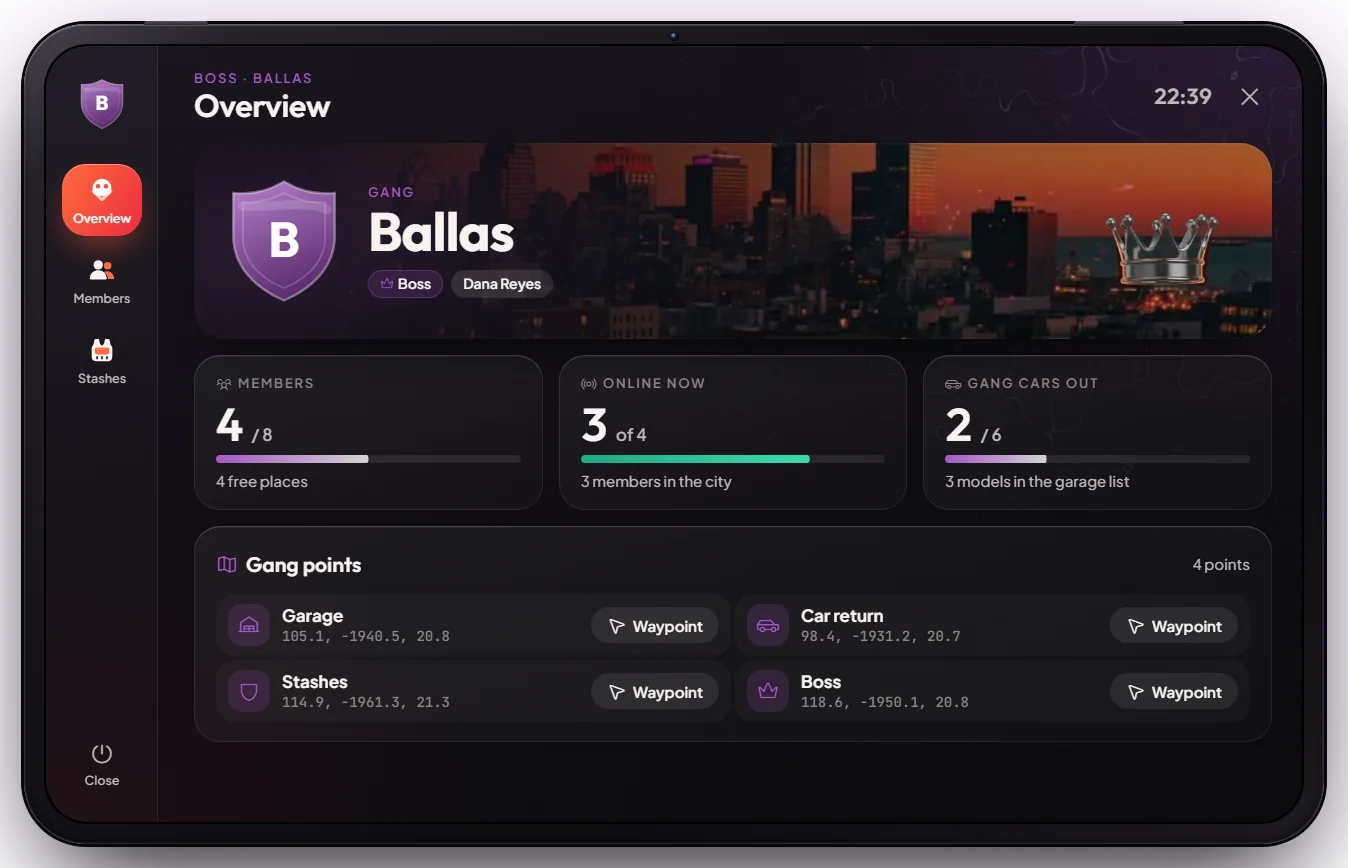
How it works
Staff create the gang
Staff open the creator, fill in the name, ranks, colour and cars, place the gang's points, and add the first boss (see Customise in game).
The boss builds the team
The boss opens the tablet at the Boss point (or with /gangtablet), invites online players, and promotes,
demotes or removes members. New members join at rank 1.
Members use the gang points
Walk to a point and press E:
| Point | What it does |
|---|---|
| Garage | Take out a gang car in the gang colour, and put it back |
| Car return (optional) | Store the gang car you are in or next to |
| Stashes | Gang stash (all members), boss stash (boss only), personal stash (just you) |
| Boss | The boss opens the gang tablet |
Each member can have one gang car out, and the whole gang up to 6 at once.
Cuff, search and escort
Use the third eye on a player on foot. Handcuff needs the Handcuffs item in your inventory (not used up; sold at the black market for $1,500 dirty money). A cuffed person can be searched, escorted, put in a car or taken out of one. Gang cuffs are separate from police cuffs.
Gang hideout doors are not locked out of the box. Create them in game with the doorlock menu (/doorlock, staff only). See Doorlock System and the official ox_doorlock guide.
Keys & commands
| Key / command | What it does | Who |
|---|---|---|
| E | Use a gang point | Gang members |
| Third eye (Left Alt) on a player | Handcuff, unhandcuff, search, escort, put in / take out of a car | Gang members |
| M | Let go of the person you escort | Gang members |
/gang <message> | Chat that only your gang members see | Gang members |
/gangtablet | Open the gang tablet | Staff or the gang boss |
/setgangmember <id> <rank> | Set the rank of a nearby player in your gang | Gang boss |
/creategang | Open the tablet on New gang | Staff |
/modifygangs | Open the tablet on the list of gangs | Staff |
/setgang <id> <gang> <rank> | Put a player in a gang at a rank (me for yourself) | Staff |
Customise in game
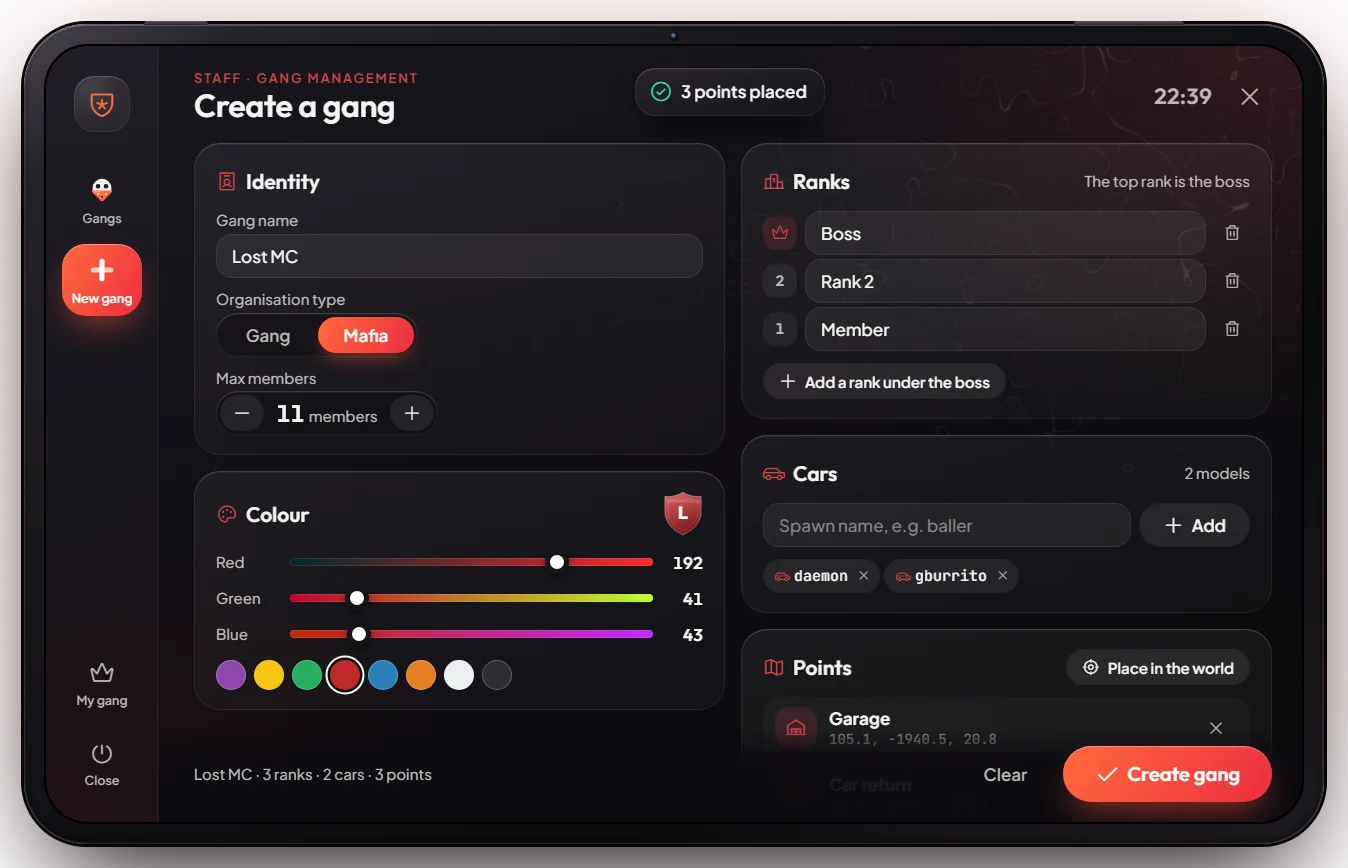
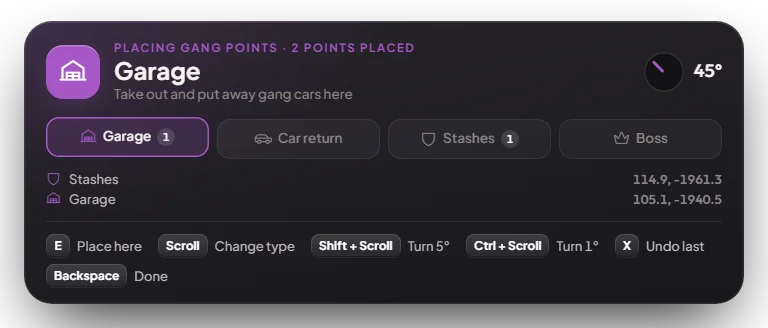
Gangs are made entirely in the tablet, nothing needs a config file:
- Type
/creategang. - Fill in the name, type (Gang or Mafia), max members, colour, ranks (lowest to highest — the top rank is the boss) and the car models the garage offers.
- Press Place in the world. Aim at the ground and press E to place a point, scroll to change the point type, X to undo, Backspace when done. A preview car shows where garage cars spawn.
- Press Create gang, then make someone the boss (Members tab, or
/setgang <id> <gang> <top rank>).
Use /modifygangs later to change details, members, cars or points, or to delete a gang. Changes apply straight away.
Config options
File: [scripts]/[gangs]/mvx_gangs/Shared/Config.lua
| Option | What it changes | Example |
|---|---|---|
Config['admins'] | Extra people with staff rights for gangs | { 'char1:abc123' } |
Config['armoryRank'] | Lowest rank that can open the gang stash | 1 |
Config['garageRank'] | Lowest rank that can take gang cars | 1 |
Config['carsPerGang'] | Gang cars out at once (0 = no limit) | 6 |
Config['armorySlots'] / armoryWeight | Gang stash size | 60 / 300000 |
Config['bossStashSlots'] / bossStashWeight | Boss stash size | 40 / 200000 |
Config['personalStashSlots'] / personalStashWeight | Personal stash size | 20 / 50000 |
Config['cuffItem'] | Item needed to cuff | 'handcuffs' |
Apply changes with restart mvx_gangs.
Admin Quick Test
Gang places are placed by staff in game, so there are no fixed coordinates. Do this anywhere with open ground (for example a parking lot). You need a second player for the cuff test.
Setup
- You need the ESX
adminorownergroup (or to be listed inConfig['admins']). - Handcuffs for the cuff test:
/giveitem me handcuffs 1.
Stage 1 — Create the gang
- Type
/creategang. The gang tablet opens on New gang. - Fill in a name without spaces (for example
TestGang), type Gang, max members10, a colour, two ranks (Member,Boss— the top rank is the boss) and one car (gburrito, press Add). - Press Place in the world. Aim at the ground and press E to place a Garage; scroll to change the type and place Stashes and Boss too. X undoes, Backspace goes back to the tablet.
- Press Create gang. You see "Gang TestGang created".
Stage 2 — Make the boss
/setgang me TestGang 2. You are now the boss (rank 2).
Stage 3 — Garage
- Walk to the Garage point: "[E] Gang garage". Press E and pick the car: it spawns in the gang colour with a gang plate.
- Stand next to it at the garage: "[E] Put the gang car away". Press E: it is stored.
Stage 4 — Stashes
- At the Stashes point press E: the menu shows Gang stash, Boss stash and Personal stash. Put an item in the gang stash.
Stage 5 — Boss tablet
- At the Boss point press E (or
/gangtablet). You see the overview (members online, cars out), Members (invite the second player) and Stashes (the item you stored). - Promote the second player with the arrows, or
/setgangmember <their id> 2standing within 10 m.
Stage 6 — Cuffs
- Third eye on the second player: Handcuff (handcuffs in your pockets). Then Search opens their inventory, Escort walks them (M to let go), Add in vehicle puts them in a car. Unhandcuff frees them.
Clean up
/modifygangs, open TestGang, Delete gang, confirm.
Result: the gang works end to end — garage, three stashes, boss tablet and cuffs. Data is saved straight away; no restart needed.
If it doesn't work: "You are not allowed" means you are not staff. "That gang does not exist" usually means a name with spaces in /setgang. "You need Handcuffs to cuff someone" means no handcuffs item. The stash needs rank 1 or higher.