
Voice & Radio System
Proximity voice chat, voice ranges and the handheld radio.
Players talk with their real voice. You hear people who are near you, and anyone on the same radio channel.
How it works
Voice. Voices come from the direction of the person talking and get quieter with distance. You have three ranges, shown on the HUD next to the street name:
| Range | Distance |
|---|---|
| Whisper | about 3 m |
| Normal (start) | about 7 m |
| Shouting | about 15 m |
Radio.
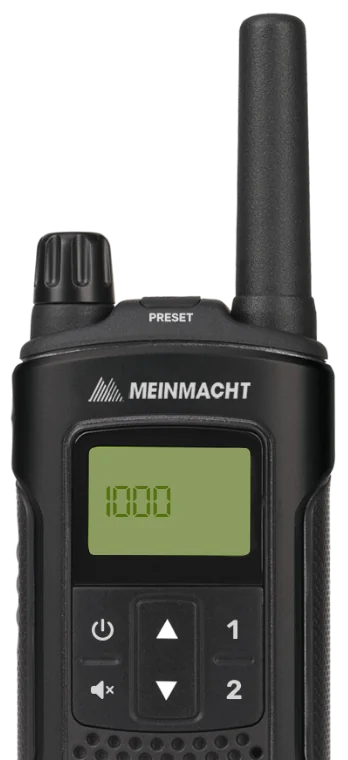
- Get a radio item. It costs $120 at Digital Den. Police get one free from their armoury.
- Use the radio from your inventory (or type
/radio). The handset opens. - Pick a channel (0 to 1000) and join it.
- Hold ` (the key left of 1) to talk. Everyone on that channel hears you, with a radio sound.
If you lose the radio item, you leave the channel. Channel 10 is for police only, channel 12 is for EMS only, and channel 11 is for police rank 2 and above.
Music, car stereos and TVs are in Misc Systems.
Keys & commands
| Key / command | What it does | Who |
|---|---|---|
| N | Push to talk. Players can switch to open mic in GTA's Settings, Voice Chat. | Everyone |
| F11 | Changes your voice range: whisper, normal, shouting | Everyone |
| ` | Talk on the radio (only while on a channel) | Everyone with a radio |
/radio | Opens the radio handset | Everyone with a radio |
/vol <0-100> | Volume of voices on the radio | Everyone |
/streamermode | Turns music from other players off and on again | Everyone |
Customise in game
Players can set the radio volume and the radio click sound in the Settings tab of the pause menu, and change keys in GTA's Settings, Key Bindings, FiveM.
Config options
Radio file: [scripts]/[standalone]/mvx_scripts/modules/radio/config.lua
| Option | What it changes | Example |
|---|---|---|
useUsableItem | Using the radio item opens the handset | true |
useCommand | /radio opens the handset | true |
commandKey | A key for /radio (empty means no key) | '' |
disconnectWithoutRadio | Leave the channel when the radio item is gone | true |
maximumFrequencies | The highest channel number | 1000 |
restrictedChannels | Channels only a job (and rank) can join | [10] = 'police', [11] = { police = 2 }, [12] = 'ambulance' |
radioEffect | Radio voices sound like a real radio | true |
radioTalkKey | The radio talk key | 'GRAVE' (the ` key) |
The voice ranges are set in [scripts]/[voice]/pma-voice/shared.lua (Cfg.voiceModes). Restart the server after
changing voice settings.
Players can pick their own radio key in GTA's Settings, Key Bindings, FiveM ("Talk over Radio"), or you can change radioTalkKey for everyone.
Admin Quick Test
You need a second player (a friend or a second PC) to hear the voice tests. In the steps below, their server ID is
called <id> (press F9 to see IDs).
Setup
- Type
/setjob me unemployed 0so you start as a normal civilian. - Type
/giveaccountmoney me money 500so you have cash for the radio. - Make sure your FiveM voice chat is on (GTA Settings, Voice Chat) and you know your push-to-talk key (N by default).
Stage 1: proximity voice
- Stand next to the second player and talk. They hear you from your direction.
- Press F11. The voice range next to the street name on the HUD changes to Shouting. Press again for Whisper, and again for Normal.
- On Whisper, walk about 5 m away and talk. The other player can no longer hear you. On Shouting they can hear you up to about 15 m.
Stage 2: buy a radio
- Teleport to Digital Den: -657.06, -858.71, 23.50 (admin tablet HOME, World, Teleport, or
/tp -657.06 -858.71 23.50). - Hold Left Alt (third eye) on the clerk and choose Open Digital Den. Buy one Radio for $120. Your cash goes down by $120 and a radio is in your inventory.
- Shortcut if you only want to test the radio:
/giveitem me radio 1.
Stage 3: public channel
- Press F2, use the radio. The handset opens.
- Set the channel to 5 and join. Ask the second player to do the same (
/giveitem <id> radio 1if they have none). - Hold ` and talk from far away (for example teleport one of you across the map). The other player hears you with a radio sound. The HUD shows your radio channel.
- Type
/vol 30. Radio voices get quieter for you.
Stage 4: police channels
- Try to join channel 10. It is refused, because you are not police.
- Type
/setjob me police 0and join channel 10 again. It works now. - Try channel 11. It is refused for a Recruit (grade 0).
- Type
/setjob me police 2(Sergeant) and join channel 11. It works now. - Try channel 12. It is refused. Type
/setjob me ambulance 0and join 12 again: it works.
Stage 5: losing the radio
- Drop or give away your radio from the inventory. You are taken off the channel at once.
The end. Voice ranges change on F11, the radio costs $120 at Digital Den (free for police at the armoury officer at Mission Row: 480.36, -996.63, 30.69), channel 10 is police only, channel 12 is EMS only, channel 11 needs police grade 2, and the channel is left when the radio is gone.
If it doesn't work: the player's FiveM voice chat is off or the wrong microphone is chosen in GTA's settings, the player has no radio item, or the job or grade is wrong for channels 10 and 11.