
Character System
Choosing or making a character, filling in the identity, designing the look and picking where to spawn.
What it is
The screens a player sees when they join: character select, the identity form, the character creator and the spawn map. Each player can have several characters, each with its own name, money, job, items and cars.
How it works
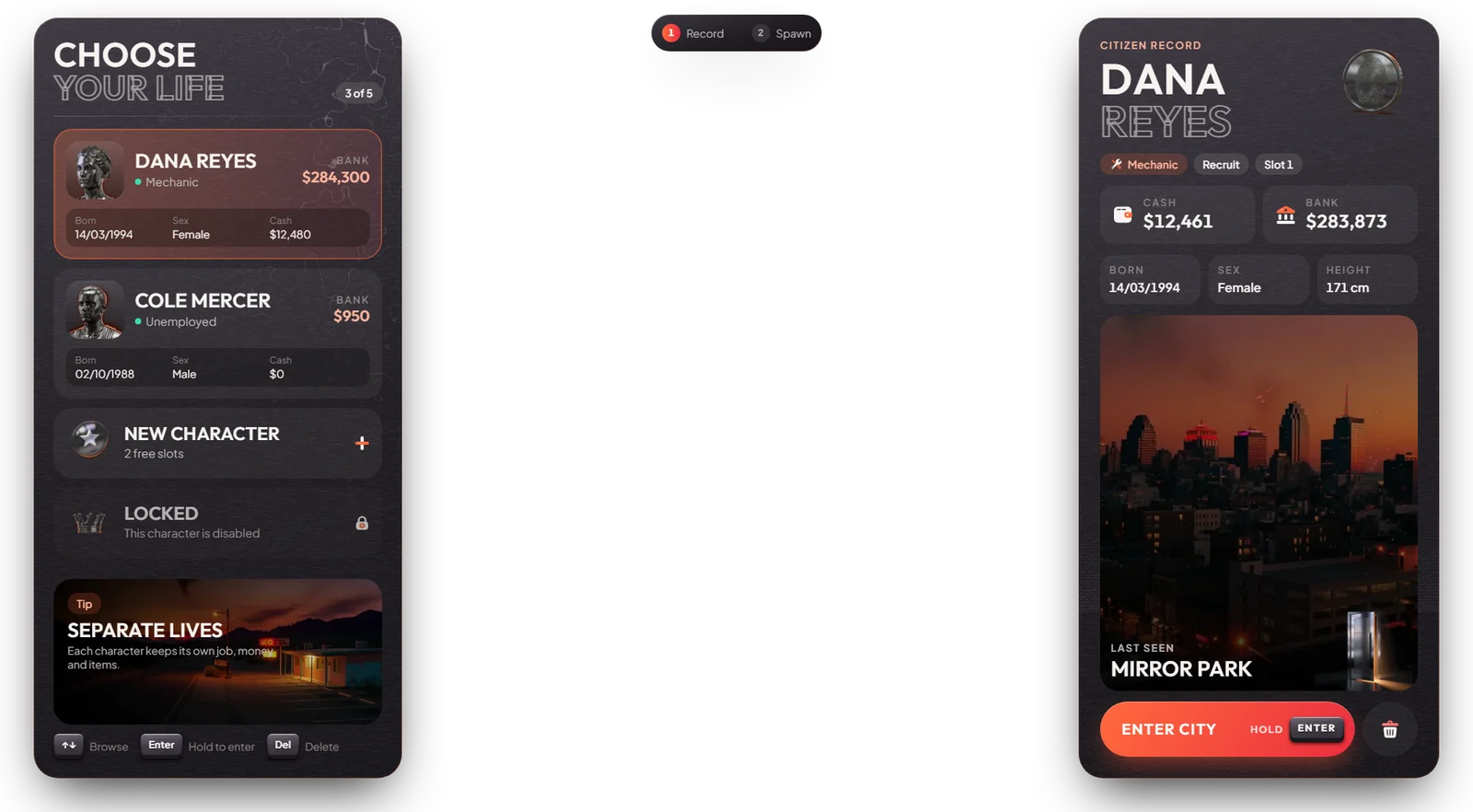
Pick a character
Use Up / Down to browse and hold Enter to play. Choose an empty slot to make a new character. Every player has 5 slots.
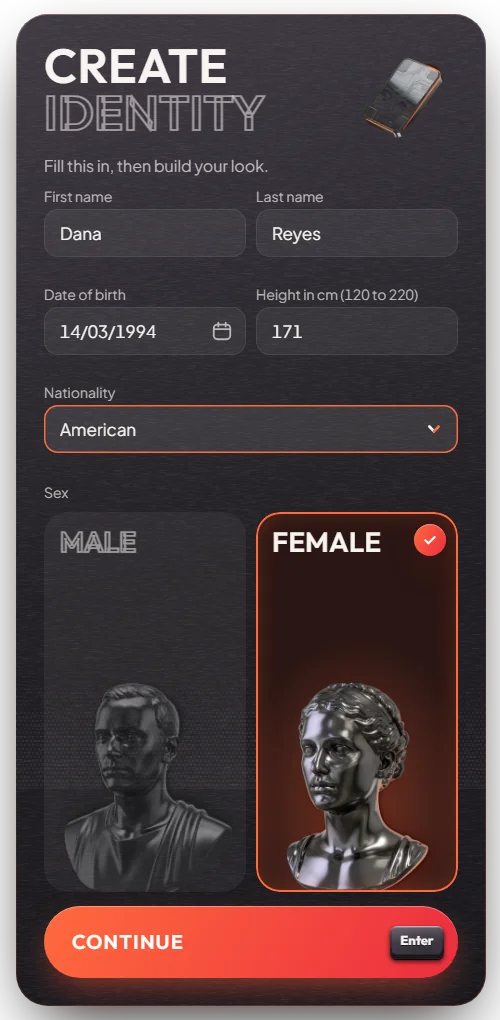
Fill in the identity (new characters)
First name, last name, date of birth, nationality, sex and height. This name is used everywhere: bank, police records and the ID card, which also shows the nationality.
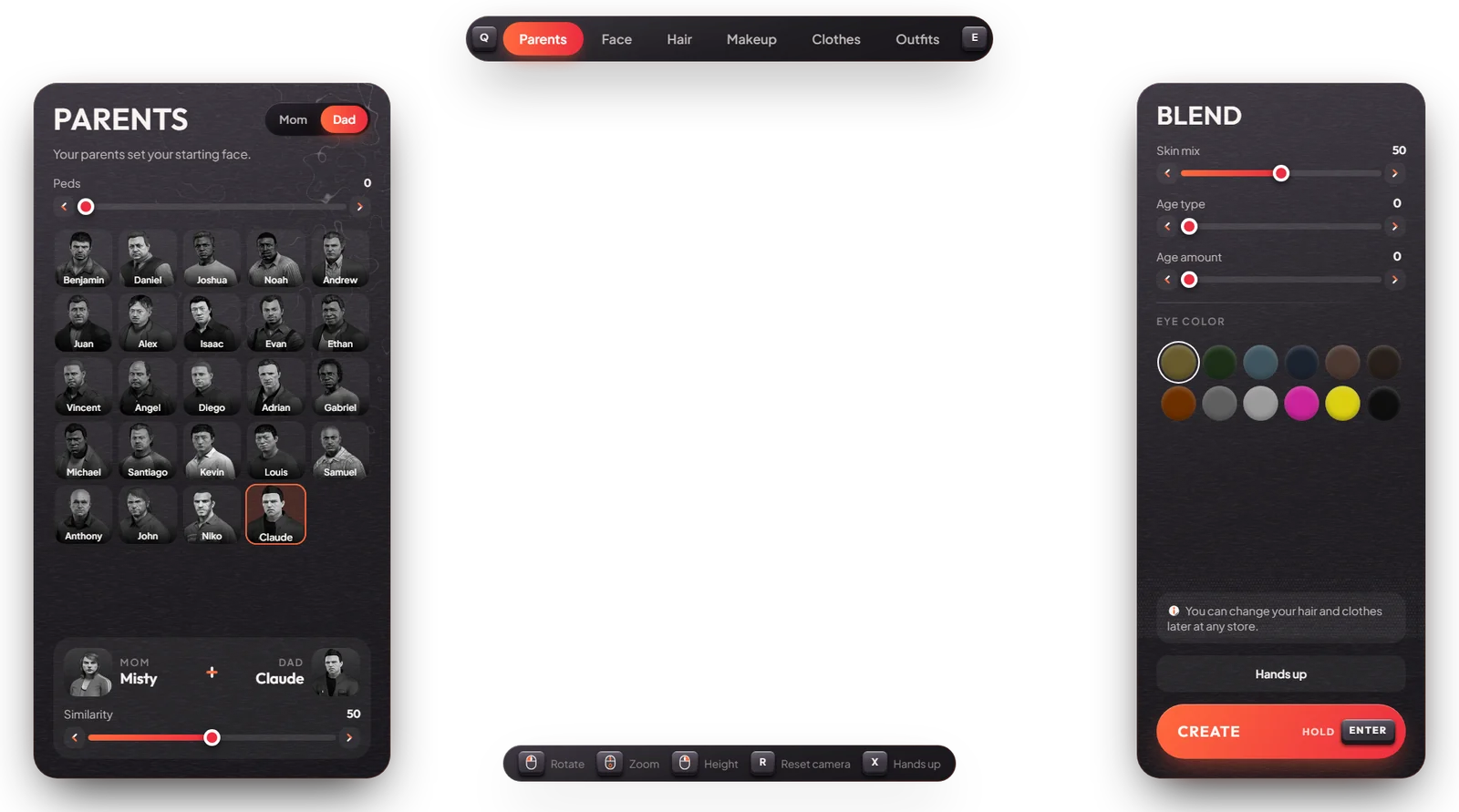
Design the look (new characters)
Pick parents, face, hair, makeup and clothes. Q / E change tabs, X puts your hands up, hold Enter to finish.
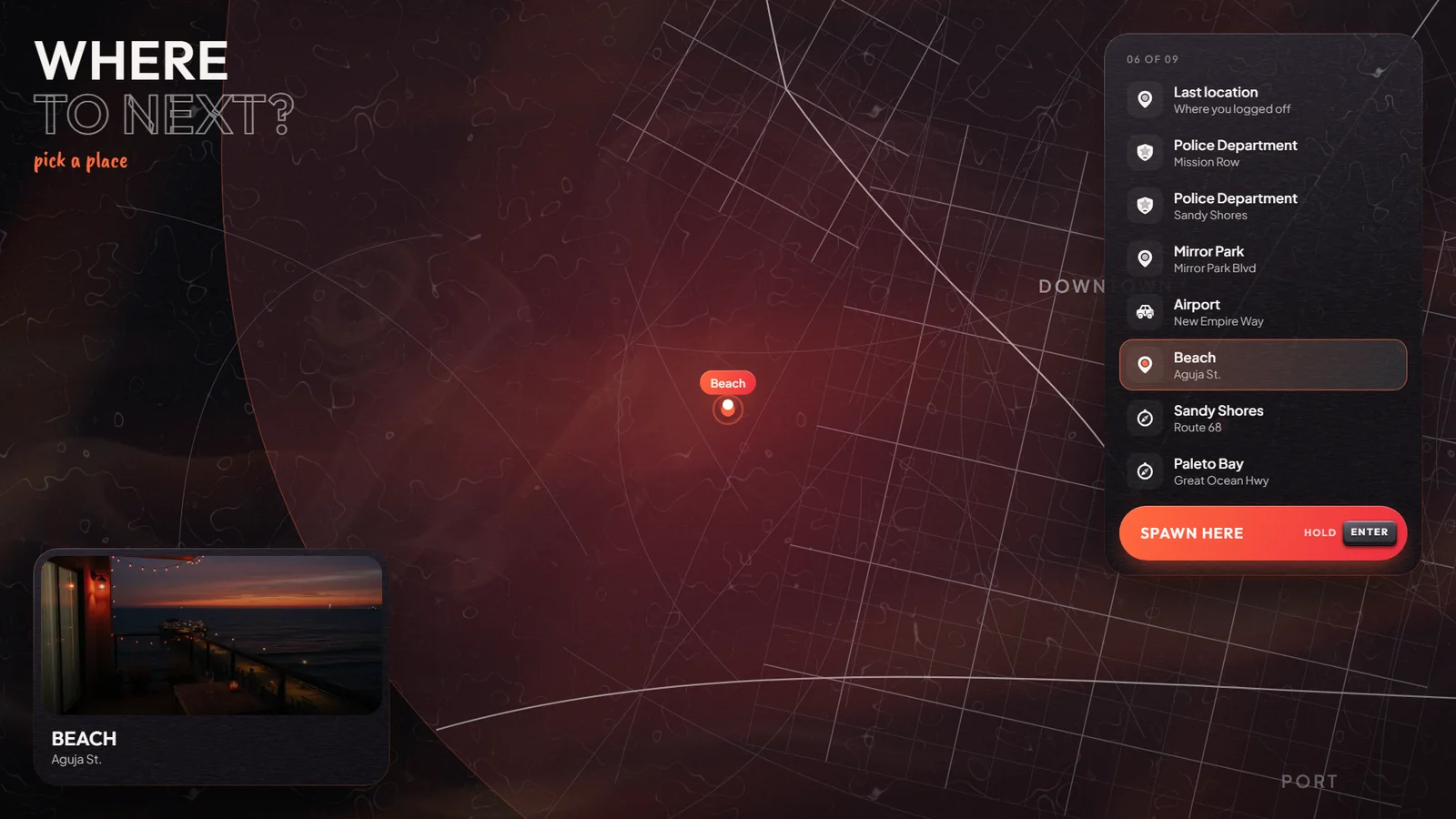
Choose where to spawn
Pick a place on the map and hold Enter. Places: Mirror Park, Airport, Beach, Sandy Shores, Paleto Bay or your last location. Police, EMS and mechanics also get their work place.
Check your controls (first spawn only)
After a new character's first spawn, the Set up your controls screen opens once. It lists every action, the key it is on for you and any keys used twice. Press Looks good to finish. You can open it again any time with /keybinds.
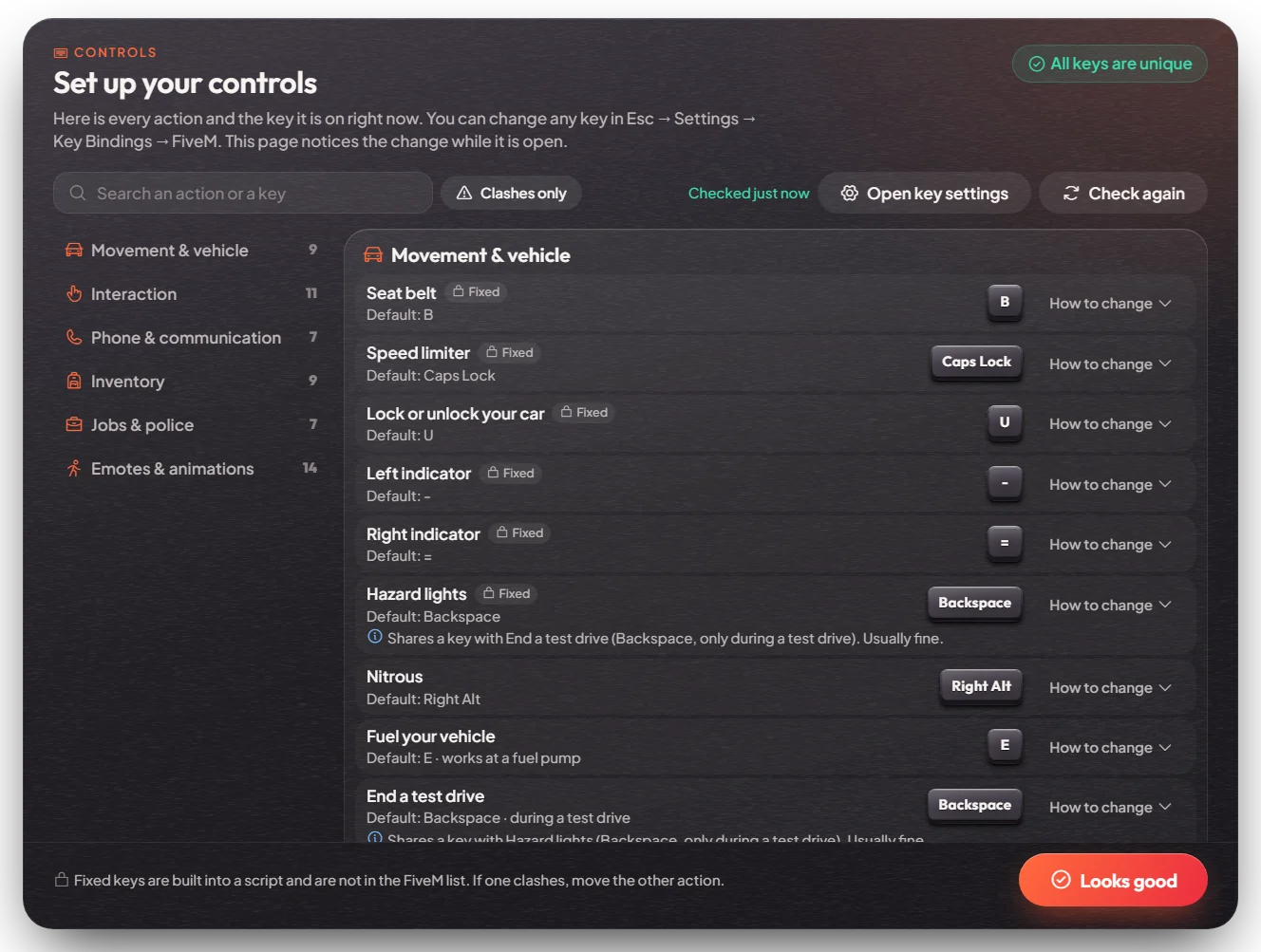
Returning players who have two actions on the same key get a short message at login, for example "2 keys are used twice — /keybinds".
What a new character gets: $3,500 in the bank, 2 water, 2 burgers, a phone, and an ID card (see ID Card & Licence System). Each player gets this start pack for at most 5 new characters; deleting and remaking a character does not refill it.
- If you died before logging off, you wake up where you died.
- If you are in jail, you go back to the prison.
- Deleting a character cannot be undone. It wipes everything the character had: cars, houses and keys, stashes and inventory, outfits, licences, jobs, unpaid bills and phone data. After deleting one, you must wait 24 hours before you can delete another.
/relogworks once every 60 seconds, and not while you are down, cuffed, in jail or in a heist.- One game account plays one character at a time: you cannot join twice with the same account, and a character already in the city cannot be picked again.
Keys & commands
| Key / command | What it does | Who |
|---|---|---|
| hold Enter | Play the selected character / spawn | Everyone |
| Del | Delete the selected character | Everyone |
/relog | Go back to character select (every 60 seconds; not while down, cuffed, jailed or in a heist) | Everyone |
/keybinds | Open the controls screen | Everyone |
/register <id> | Open the identity form again for a player (to fix a name) | Admin |
/char <id> | Open the character creator again for a player | Admin |
/setslots <licence> <slots> | Give a player a custom number of slots | Admin |
/disablechar <identifier>, /enablechar <identifier> | Lock or unlock a character | Admin |
/deletecharacter <identifier> | Delete a character for good | Admin |
Config options
The resource is [esx]/[character]/mvx_character. Each part has its own config in modules/<part>/.
| Option | File | What it changes | Example |
|---|---|---|---|
Config.Slots | multichars/config/config_server.lua | Character slots per player | 5 |
Config.CanDelete | multichars/config/config.lua | Players may delete their own characters | true |
Config.DeleteCooldown | multichars/config/config_server.lua | Wait time between two deletes | 24 * 60 * 60 (24 hours) |
Config.StarterItems | multichars/config/config_server.lua | Items a new character gets | water x2, burger x2, phone x1 |
Config.StarterGrantsPerLicense | multichars/config/config_server.lua | How many new characters per player get the start pack | same as the slots |
Config.Spawns | spawnselector/config.lua | The spawn places on the map | 5 places |
Config.OnlyJobsSpawns | spawnselector/config.lua | Extra spawn places for one job | police, ambulance, mechanic |
Config.OnDeadOnlyLastPosition | spawnselector/config.lua | Dead players must spawn where they died | true |
Config.LimitYear | identity/config/config.lua | Allowed birth years | {1900, 2010} |
The start money is set in [core]/es_extended/config.lua as Config.StartingAccountMoney = { bank = 3500 }.
Admin Quick Test
A full run from character select to spawn, then the staff tools.
Setup
- Be
admin(see Admin System). No items or money are needed.
Character select
- Type
/relog. You go back to character select and see your characters on the left. You can use/relogonce every 60 seconds; a second try sooner says how many seconds to wait. - Pick an empty slot (New character) and hold Enter. The identity form opens.
Identity
- Leave a field empty and press Continue: that field shows what to fix.
- Fill in a first and last name (Latin letters, under 20), a date of birth as dd/mm/yyyy (year 1900 to 2010), nationality, sex and a height of 120 to 220. Press Continue. The character creator opens.
Creator
- You stand in underwear. Use Q / E to go through Parents, Face, Hair, Makeup, Clothes and Outfits. Change a few things.
- Hold Enter. The character is made and the spawn map opens.
Spawn
- Pick Mirror Park and hold Enter. You wake up at 1127.14, -645.29, 55.79. A few seconds later Set up your controls opens by itself (first spawn only). Press Looks good to close it.
- The other places: Airport -1037.80, -2737.82, 19.17; Beach -1265.34, -1481.28, 3.33; Sandy Shores 1138.84, 2672.44, 37.13; Paleto Bay 159.59, 6587.62, 31.12.
Start pack
- Type
/bank: it shows $3,500. Open your inventory with F2: 2 water, 2 burgers, a Phone and an Identity card (can take up to a minute after spawning).
Job spawns
- Type
/setjob me police 0, wait a minute after your last/relog, then/relogand play the same character. The spawn list now also shows Police Department (Mission Row 427.18, -974.64, 30.71 and Sandy Shores 1854.20, 3681.26, 33.27). Type/setjob me unemployed 0afterwards.
Staff tools
- Type
/register <your id>. The identity form opens again (to fix a wrong name). - Type
/char <your id>. The creator opens with a Cancel button; cancel to keep your look. - Wait a minute, type
/relog, select the test character, press Del and confirm. The character and everything it owned (cars, items, licences, bills) are gone. Try to delete another character right away: it says you can delete another in about 24 hours.
If it doesn't work: no $3,500 on a new character → this player already used the 5 start packs for their licence. You cannot pick a place → the character died before logging off and must spawn where it died. /relog refused → wait 60 seconds, or you are down, cuffed, in jail or in a heist.