
Chat System
The chat window, its roleplay commands and the job chats.
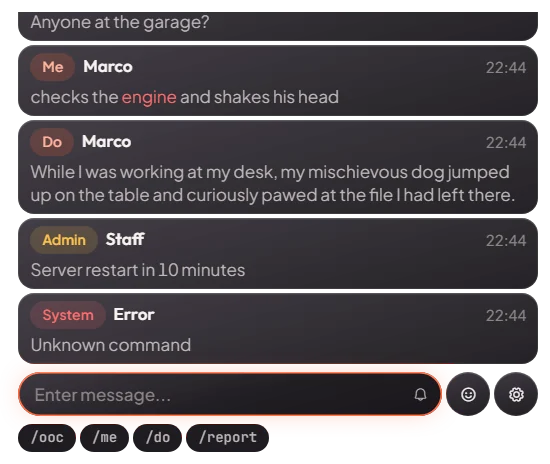
The chat is where players type roleplay actions, talk out of character, post adverts and use commands.
How it works
Press T to open the chat and type a message or a command. Each kind of message has its own colour, so it
is easy to see what is an action, an out-of-character message or a job message. When you start typing /, the chat
suggests commands. There is also an emoji picker and a settings button.
Keys & commands
| Key / command | What it does | Who |
|---|---|---|
| T | Opens the chat | Everyone |
/me <text> | An action, for example /me opens the door. Only players near you see it. If you wear a mask, your name is hidden. | Everyone |
/do <text> | A description, for example /do the door is locked. Only players near you see it. | Everyone |
/ooc <text> | Out-of-character message to everyone | Everyone |
/tweet <text> | A Twitter-style post to everyone | Everyone |
/yellowpages <text> | An advert to everyone. Costs $500 from your bank. | Everyone |
/whisper <id> <text> | A private message to one player | Everyone |
/showidentity | Shows your name, gender, date of birth and job to players right next to you | Everyone |
/charinfo | Shows your own name, job, bank and cash | Everyone |
/clearchat | Clears your chat | Everyone |
/playmusic <link> | Plays music from a link around you. Players near you hear it too. /stopmusic stops it, /musicvolume <0-100> sets the volume. | Everyone |
/police <text> | Message to all police | Police |
/emschat <text> | Message to all EMS | EMS |
/gang <text> | Message to the members of your own gang | Gang members |
/announce <text> | A server-wide announcement | Admins |
/adminwhisper <text> | A message to staff | Admins |
Other systems add their own commands to the chat, for example /hud (HUD System) and /report
(Misc Systems).
Config options
File: [cfx]/[gameplay]/mvx_chat/Config.lua
| Option | What it changes | Example |
|---|---|---|
Config.ShowChatKey | Key that opens the chat | 'T' |
Config.YellowPageFee | Bank money a yellow pages advert costs. 0 makes it free. | 500 |
Config.EnableEmojiMenu | Shows the emoji picker | true |
Config.OOCMessageWithoutCommand | If true, a message without a command is sent as OOC | false |
Config.DefaultSuggestions | Commands shown first in the suggestions | { command = 'me', color = '#00000098' } |
Config.TypeColors | The colour of each kind of message |
Restart mvx_chat after a change.
Admin Quick Test
A second player helps to check who sees what. Their server ID is <id> below (press F9 to see IDs).
Setup
- Type
/setjob me unemployed 0and/giveaccountmoney me bank 1000. - Ask the second player to stand next to you.
Stage 1: roleplay messages
- Press T. The chat opens and suggests commands when you type
/. - Type
/me waves. You and the player next to you see it in the "me" colour with your name. - Ask the second player to walk more than 10 m away and type
/do the door is locked. They no longer see it. - Put on any mask (clothing store or the Appearance System) and type
/me nods. The name shows as Anonymous.
Stage 2: messages to everyone
- Type
/ooc hello. Every player sees it, wherever they are. - Type
/tweet first post. Every player sees a Twitter-style post. - Type
/yellowpages Test advert. Every player sees the advert and $500 leaves your bank. Check with/charinfobefore and after: the bank is $500 lower. - Type
/whisper <id> hi. Only that player sees it.
Stage 3: personal commands
- Type
/charinfo. Only you see your name, job, bank and cash. - Type
/showidentitywith the second player right next to you (under 3 m). They see your name, gender, date of birth and job. - Type
/playmusic <a music link>. Music plays around you and the second player hears it nearby./musicvolume 20makes it quieter,/stopmusicstops it. - Type
/clearchat. Your chat is empty.
Stage 4: job and admin chats
- Type
/police test. Nothing is sent, because you are not police. - Type
/setjob me police 0and/police testagain. Only players on the police job see it. - Type
/setjob me ambulance 0and/emschat test. Only players on the ambulance job see it. - Type
/announce Server test. Every player sees the announcement./adminwhisper testgoes to staff only.
The end. Roleplay messages stay within 10 m, OOC, tweets, adverts and announcements reach everyone, a yellow pages advert costs $500 from the bank, and job chats only reach that job.
If it doesn't work: the player does not have $500 in the bank for an advert, the job name is wrong for job chats,
the player is not an admin for /announce, or a message was sent again too fast (there is a short wait).