
Fuel System
Cars use fuel, and players fill up at petrol stations with cash or card.
What it is
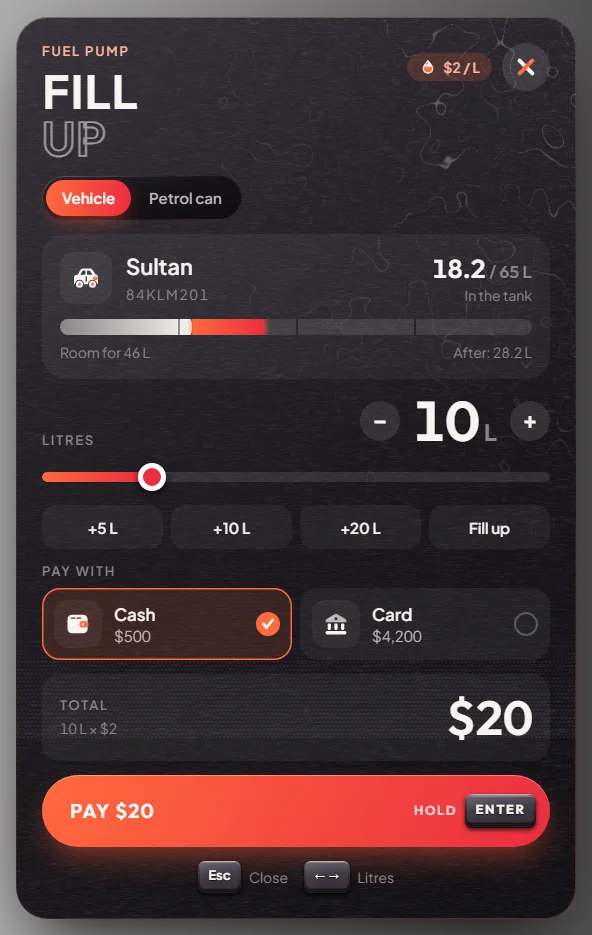
Vehicles burn fuel while driving. Players fill up at any petrol station like at a real pump: pick the litres, pay, then take the nozzle and fill the car.
How it works
Park and get out
Park next to a pump and step out. Standing at the pump shows [E] Fuel.
Pick litres and pay
Press E. Drag the slider or press +5 L, +10 L, +20 L or Fill up. The slider stops at what still fits in the tank. Pick Cash or Card and hold Enter to pay. Fuel costs $2 a litre.
Fill the car
Take the nozzle, walk to the car's fuel cap and press E. A small card shows the litres and price so far. Press X to stop early; you only pay for what went in.
Hang it up
Hang the nozzle back on the pump with E. If you walk too far away, it goes back by itself.
Petrol can. The pump menu has a Petrol can tab: buy a full can for $80 or refill yours for $55. Hold the can, stand at a car's fuel cap (within 4 m of the car) and press E to pour.
Keys & commands
| Key | What it does | Who |
|---|---|---|
| E at a pump | Open the pump menu, take / insert / hang up the nozzle | Everyone (rebindable as "Fuel vehicle") |
| X | Stop fuelling | Everyone |
Config options
File: [ox]/ox_fuel/config.lua
| Option | What it changes | Example |
|---|---|---|
pricePerLitre | Price per litre (whole dollars) | 2 |
pumpRate | Litres per second while filling | 2.0 |
defaultTankSize | Tank size for cars that have none set | 65.0 |
hoseLength | How far the hose reaches (metres) | 7.5 |
globalFuelConsumptionRate | How fast all cars burn fuel (higher = faster) | 10.0 |
showBlips | Station icons: 0 none, 1 nearest, 2 all | 2 |
petrolCan.enabled | Petrol cans on or off | true |
petrolCan.price / refillPrice | Price of a new can / a refill | 80 / 55 |
Admin Quick Test
Setup
- Give yourself money:
/giveaccountmoney me money 500and/giveaccountmoney me bank 500. - Teleport to the Strawberry petrol station:
/tp 264.74 -1260.98 29.18. - Spawn a car:
/car sultan. Drive it next to a pump and get out.
Fill up
- Stand at the pump. Expected: [E] Fuel.
- Press E. Expected: the pump menu shows the car's tank, how many litres are in it and how many still fit. If the tank is already full there is nothing to buy; drive around for a while first.
- Press +10 L, pick Cash and hold Enter. Expected: the pump is paid for 10 L at $2 a litre.
- Take the nozzle, walk to the car's fuel cap and press E. Expected: a small card counts up litres and price, 2 litres a second.
- Press X after a few litres. Expected: fuelling stops and you only pay for the litres that went in.
- Hang the nozzle back on the pump with E.
Card and petrol can
- Open the pump menu again, pick Card and Fill up. Expected: the money comes from the bank.
- Open the Petrol can tab and buy a can. Expected: $80 less and a petrol can (
WEAPON_PETROLCAN) in your inventory. Stand at a car's fuel cap, within 4 m of the car, and press E to pour. Expected: the tank goes up.
The end
- Remove the car with
/dv. Result: the tank is fuller, you paid $2 a litre, plus $80 for the can.
If it doesn't work
No [E] Fuel prompt: you are still in the car or not at a pump. The nozzle goes back by itself if you walk more than 7.5 m away, get in a car or die.