
TV & Car Stereo
Watch YouTube on TVs, start live channels and play music in your car.
What it is
Play YouTube on any TV in the world or from a car stereo. Everyone nearby sees and hears the same thing, louder when they are close.
How it works
TVs
- Stand near a TV and type
/tv. - Pick YouTube and paste a link. The video plays for everyone nearby. Only YouTube links work (youtube.com or youtu.be); other links are refused.
- TV Channels lets you flip through live channels, Set Volume changes only your own volume, Turn Off stops the TV.
Live channels: staff type /broadcast, give a channel name and a YouTube link. Every free TV shows it. Type /broadcast again to stop.
Car stereo
- Buy a Car Radio at Digital Den ($180).
- Sit in a car and use the item. The stereo opens.
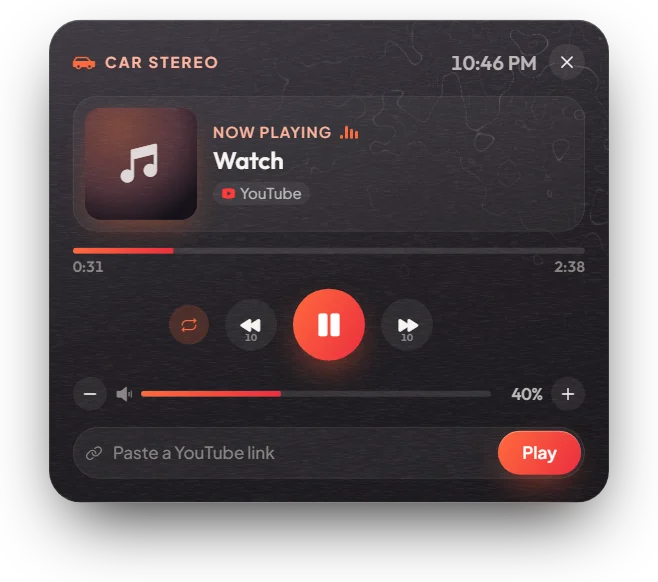
- Paste a YouTube link (other sites are refused) and press Play. Use the buttons for pause, skip 10 seconds, loop and volume. The music belongs to the car, so it keeps playing when you get out.
Keys & commands
| Command / item | What it does | Who |
|---|---|---|
/tv near a TV | Open the TV menu | Everyone |
/broadcast | Start or stop a live channel | Staff (and jobs you allow) |
| Car Radio item, in a car | Open the car stereo | Everyone |
Config options
| Option | File | What it changes | Example |
|---|---|---|---|
Config.Broadcast.Jobs | [scripts]/[standalone]/mvx_scripts/modules/tv/config.lua | Jobs that may broadcast besides staff | { 'reporter' } |
Config.Locations | same file | Standing TVs placed in the world | one at Legion Square |
Config.BannedWords | same file | Words blocked in links and channel names | { 'google' } |
Config.DistanceToVolume | modules/music/config.lua | How far car music carries at full volume | 30.0 metres |
Config.PlayToEveryone | same file | false = only people inside the car hear it | true |
Config.ItemInVehicle | same file | Item needed; false uses the /carradio command | "carradio" |
Admin Quick Test
Setup
- Be
adminorowner(needed for/broadcast). Type/giveaccountmoney me money 500. Have one or two YouTube links ready.
TV
- Type
/tp 144.30 -1037.46 29.42(standing TV, Legion Square). The TV is in front of you. - Type
/tv. The Television menu opens at the top right. - Pick YouTube and paste a link. The video plays on the TV; a second player nearby sees and hears the same.
- Set Volume to 20. Only your volume changes.
- Turn Off. The TV stops for everyone.
Live channel
- Type
/broadcast. Give the channel name "Test" and a YouTube link. The free TV starts showing your channel. - Type
/tv→ TV Channels. "Test" is listed; flip with Left / Right. - Type
/broadcastagain. The channel stops. You can start a new one after 30 seconds.
Car stereo
- Type
/tp -657.06 -858.71 23.50(Digital Den). Third eye on the clerk → Open Digital Den and buy a Car Radio Device ($180). Or type/giveitem me carradio 1. - Type
/car sultanand sit in it. Use the Car Radio Device from your inventory (F2). The stereo opens. - Paste a YouTube link and press Play. The cover and title show and music plays. Try pause, skip 10 seconds, loop and volume.
- Get out and walk away. The music keeps playing from the car and gets quieter with distance.
If it doesn't work: /tv says nothing → stand closer to a TV. The link is refused → only YouTube links work. /broadcast refused → your rank is not admin or owner. The stereo does not open → you must sit in the car and carry the item.