
Vehicles, Valet & Mechanic
See your cars, have one delivered by a valet, and get mechanic help from the phone.
What it is
- Vehicles lists every car you own and where it is.
- Valet has a driver bring one of your stored cars to you, for a fee.
- Mechanic shows how worn your cars are, your service history and invoices, and lets you send for roadside help.
How it works
Vehicles
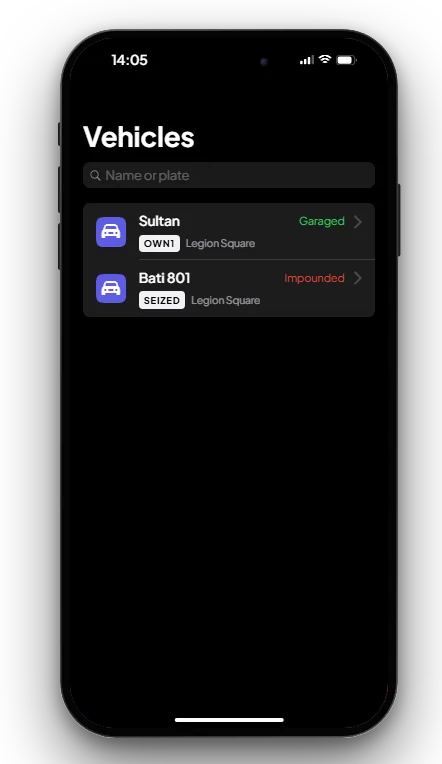
Open Vehicles. Each car shows its plate and state: Garaged (in a garage), Out (in the city), Depot or Impounded (taken by police). See Garage System.
Valet
- Valet is not on a new phone: get it from the Store (see Settings & Store).
- Open Valet and pick a car that is in one of your garages.
- A driver sets off out of sight and drives the car to you. Follow the Valet blip on the map. The delivery takes 30 seconds to 2 minutes, longer for cars parked far away.
- When the car arrives you get the keys. The fee is $250 from your bank.
- Impounded cars and job cars cannot be delivered. If the driver is late, the car is left near you.
Mechanic
- Get Mechanic from the Store.
- See each car's parts (low parts are marked), its service history and your mechanic invoices.
- Find an open garage, call a mechanic, or send a roadside request with your car next to you (one every 2 minutes).
- Mechanics on duty see the requests, can accept them and get a GPS waypoint. They also use the app for their duty and invoices. See Mechanic System.
Keys & commands
| Key / command | What it does | Who |
|---|---|---|
| F1 | Opens the phone | Everyone with a phone |
Config options
File: [scripts]/[phone]/mvx_phone/config.lua
| Option | What it changes | Example |
|---|---|---|
Config.Valet.Fee | Price of one delivery | 250 |
Config.Valet.Account | Where the fee is paid from | 'bank' or 'cash' |
Config.Valet.MinTime / MaxTime | Shortest and longest delivery time in seconds | 30 / 120 |
Config.Valet.BlockedJobs | Jobs that cannot use the valet | {} |
Config.Mechanic.LowAt | % left at which a part shows as low | 40 |
Config.Mechanic.Roadside.Cooldown | Seconds between two roadside requests | 120 |
Config.Mechanic.Roadside.Expire | Seconds a request waits for a mechanic | 600 |
Admin Quick Test
Setup
- Type
/giveitem me phone 1and/giveaccountmoney me bank 1000. - Type
/givecar <your id> sultan(your number from F9). The car is saved in your garage.
Stage 1: Vehicles
- Press F1 and open Vehicles. The Sultan is listed as Garaged.
Stage 2: Valet
- Open Store and get Valet.
- Open Valet, pick the Sultan and confirm. $250 leaves your bank and a Valet blip appears.
- Wait. Within 30 seconds to 2 minutes a driver brings the car to you and you get the keys.
- Open Vehicles again: the Sultan now shows Out.
Stage 3: Mechanic
- Get Mechanic from the Store and open it. The Sultan's parts and service history are shown.
- Type
/setjob <id> mechanic 0for a second player. Stand next to the Sultan and send a roadside request. The mechanic gets the request in their Mechanic app and can accept it.
The end. The car is delivered for $250 and mechanics receive roadside requests.
If it doesn't work: the car is impounded or a job car, there is less than $250 in the bank, or the app was not installed from the Store.